
 |
MMS Sample Screens
|
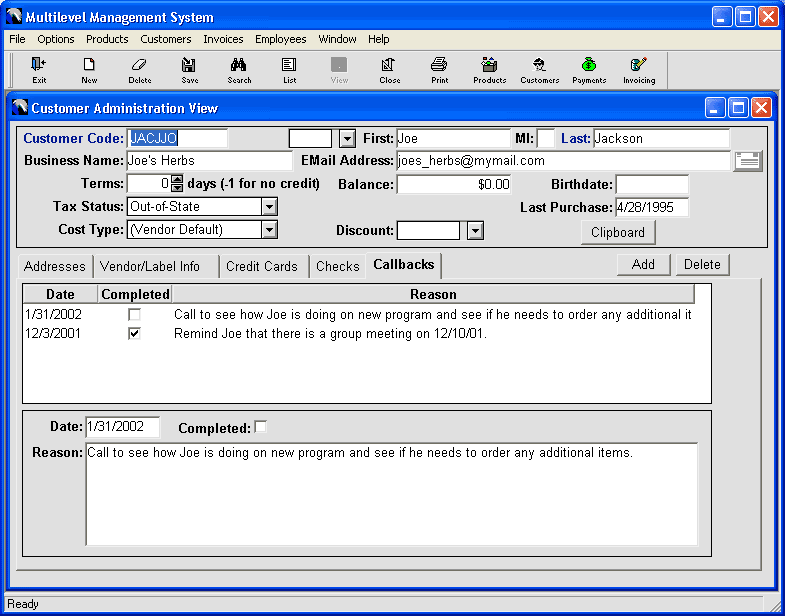
If you are having trouble remembering when to call your clients back, you can use the MMS callback feature. You enter your callbacks on the customer record as shown below. Each time MMS starts, it checks for callbacks that are due and not yet completed. If there are any, it will display a window showing the customer name, their phone number, and the reason for the callback. From that window or the customer adminstration window, you can mark the callback as completed or delete it alltogether.
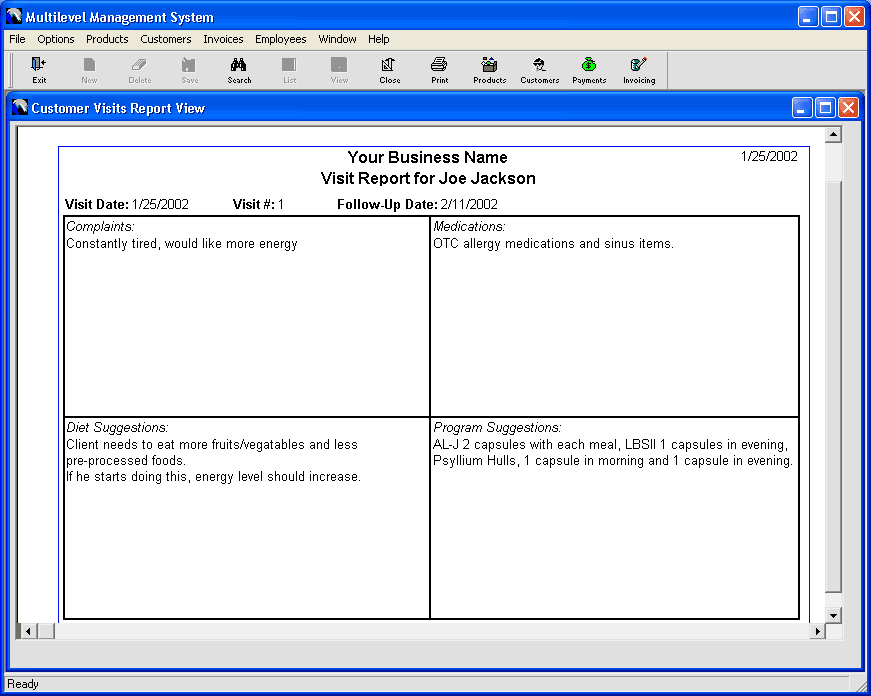
Tracking your consultations with your clients can take time and office space storing the records of each visits. With the MMS customer visits feature, you can enter information about each customer visit including visit date, visit number, follow-up date, client complaints and medications, your diet and program suggestions. This information is saved and can be printed, as shown below, in a professional format that can be given to your client as part of their consultation.
Home Software Equipment Supplies Shopping Cart Site Map Contact Us Ordering Information
Website Copyright© 2002-2024 Sunshine POS, LLC
Sunshine POS, LLC
40913 N 3rd Ave
Phoenix, AZ 85086
Orders, Inquiries, Tech Support: (623) 328-8919
Or send an EMAIL to
info@sunshinesupport.com